Creating integration with Autotask
After you connect to the Kaspersky Endpoint Security Cloud, the integration properties window opens, where you can create an integration between Autotask and Kaspersky Endpoint Security Cloud by means of Kaspersky Security Integration Tool for MSP.
Creation of an integration between Autotask and Kaspersky Endpoint Security Cloud is required only when you launch Kaspersky Security Integration Tool for MSP for the first time.
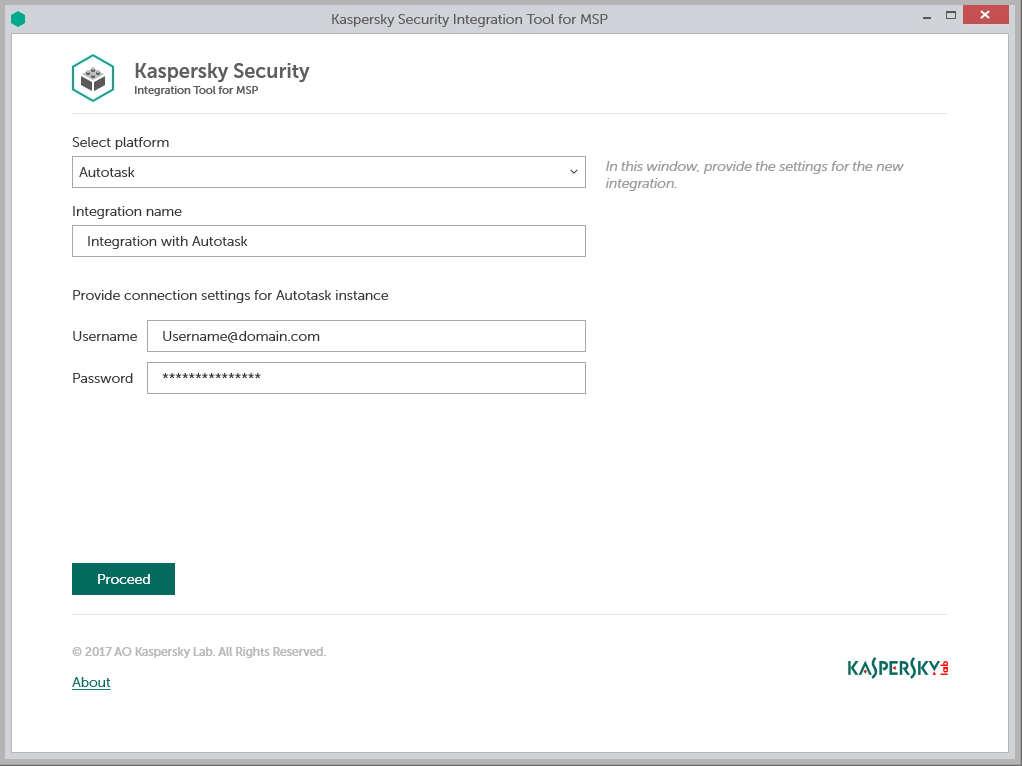
To create integration with Autotask:
- In the Integration Settings window that opens after you connect to the Kaspersky Endpoint Security Cloud, specify the following settings for the newly created integration:
- Select platform—Select the integration platform from the drop-down list.
- Integration name—Name of the new integration. This field cannot be blank. By default, the integration name is Integration with <Platform_Name>.
- User name—User name for the Kaspersky Security Integration with Autotask to connect to Autotask.
- Password—Password for the user name, specified to connect to Autotask.
Recommendations for credentials used for integration:
- Create and use a separate dedicated user with the API User security level rather than providing your own credentials, which you use to log in to Autotask.
- For all the users used exclusively as an API User, the API User security level must be assigned. This security level must be set as Not required to change password. Since the API User security level does not allow logging in by means of the user interface, it eliminates many potential security risks of using an integration.
To set up Not required to change password security level:
- In Autotask select: Admin -> Features & Settings and then expand the Resources/Users node and click Resources/Users.
- Right click the user name in the Resource Name column and select Edit Resource.
- Open the Security tab, then in the Security Level drop-down list select API User.
- Click the Save & Close button.
- Select: Admin -> Features & Settings and then expand the Resources/Users node and click Security Levels.
- Click the Pencil icon next to the API User value in the Name column.
- Expand the Other node and select the Not required to change password (password does not expire) check-box.
- Click Save & Close.
- Click the Proceed button when you have finished specifying the integration settings.
The system validates the Autotask integration settings and permission level for the specified credentials. If the settings you provided are correct, they are saved and then used by Kaspersky Security Integration with Autotask to access Autotask.
The permission level of the credentials you provided must be high enough to perform all operations in Kaspersky Security Integration Tool for MSP; otherwise, an error occurs, and integration for the user with these credentials cannot be created. For example, integration cannot be created for a user lacking permissions for editing tickets in Autotask.
Kaspersky Endpoint Security Cloud is now integrated with Autotask.